Property Monitoring Software
Empowering Baytowne Apartments with Smart Security and Seamless Management Solutions
PRODUCT DESIGN · UX RESEARCH

PROJECT OVERVIEW
The Property Monitoring Software for Baytowne Apartments is a comprehensive solution designed to enhance security and streamline property management. This project addresses critical security challenges by integrating advanced gate management, real-time security feeds, and efficient leakage sensor monitoring.
MY ROLE
Product Design, User Research, Wire-framing, UX/UI Design
THE TEAM
2 Designers, 1 Product managers and 4+ Engineers
TIMELINE
3 Months
PROBLEM
Baytowne Apartments faces significant security challenges that impact the safety and satisfaction of its residents and property managers. The existing system struggles with managing gate access, monitoring real-time security feeds, and detecting leaks efficiently.
This results in unauthorized access, delayed responses to security incidents, and undetected leaks, leading to potential safety hazards and property damage.
To address these issues, Baytowne Apartments requires a comprehensive security management solution that integrates advanced gate management, real-time monitoring, and reliable leak detection to ensure a secure and well-managed living environment.
SOLUTION
To address the security challenges at Baytowne Apartments, we developed a comprehensive Security Management Software that integrates advanced features for gate management, real-time monitoring, and leak detection
Gate Management:
-
License Plate Reader: Automatically recognize and grants access to authorized vehicles.
-
Visitor Call Box: Facilitates secure communication with visitors.
-
Access Codes: Generates one-time and recurring access codes for visitors.
-
Visitor Records: Maintains detailed logs of all visitor activity.
Security Management:
-
Live Camera Feeds: Provides real-time video monitoring of the property.
-
Sensor Records: Keeps track of all security sensor activities.
-
Video Alerts: Sends immediate alerts for any security breaches.
-
Event-Based Playback: Allows quick review of video footage based on specific events.
Property Monitoring:
-
Sensor Status: Monitors the online/offline status of all security sensors.
-
Leak Detection: Tracks and records any detected leaks.
-
Temperature Output: Displays real-time temperature readings to prevent potential issues.
Tenant Living Experience:
-
Mobile Access: Monitors the online/offline status of all security sensors.
-
Visitor Code Generation: Tracks and records any detected leaks.
-
Surrounding Insights: Displays real-time temperature readings to prevent potential issues.
ROADMAP OF PROJECTS

STEP 1
During the project kickoff and research phase of the Security Management Software project for Baytowne Apartments, We gathered crucial information and insights that laid the groundwork for the entire design and development process. Here are some key things we gathered :
-
Defined the overarching goals of the project, such as improving security measures, enhancing property management efficiency, and ensuring resident satisfaction.
-
Established the scope of the project, outlining the specific features and functionalities to be included in the software.
-
Met with stakeholders from Baytowne Apartments, including management, security personnel, and possibly residents.
-
Gathered detailed requirements and priorities from stakeholders, understanding their pain points, challenges, and expectations from the new security management system.
-
Identified key user groups (e.g., residents, property managers, security staff) and their specific needs related to security monitoring, gate access, visitor management, and property monitoring.
COMPETITIVE ANALYSIS


Since no direct competitor integrates IoT devices into a single dashboard, we explored businesses that specialize in either security management or sensor management. Using insights from these fields, we developed a solution that combines both security and sensor management, perfectly aligning with the client's requirements.
KEY INSIGHTS AND OPPORTUNITIES
-
User Experience Focus: Many competitors focus on feature-rich solutions but struggle with usability and interface complexity. Opportunity to design a simpler, more intuitive interface.
-
Integration and Compatibility: Addressing the challenge of integrating with existing systems and offering seamless compatibility could provide a competitive edge.
-
Cost-Effectiveness: Offering competitive pricing models and flexible payment options could appeal to budget-conscious property managers.
-
Innovation in Security: Leveraging emerging technologies like AI for smarter security management and predictive analytics for proactive monitoring.
DESIGN THEME

Persona 1
Name: Jessica Martinez
Occupation: Property Manager at Baytowne Apartments
Age: 45
Location: Champaign IL
-
Manages multiple properties, including Baytowne Apartments.
-
Has over 15 years of experience in property management.
-
Responsible for overseeing security, maintenance, and resident satisfaction.
Goals
-
Ensure the safety and security of all residents.
-
Efficiently manage property operations and maintenance tasks.
-
Keep detailed records of security events and sensor alerts.
Pain Points
-
Current security systems are fragmented and lack integration.
-
Difficulties in accessing and analyzing security footage and sensor data.
-
Time-consuming to manage visitor access and track maintenance issues.
Persona 2
Name: Mark Thompson
Occupation: Resident at Baytowne Apartments
Age: 32
Location: Champaign IL
-
Lives alone in a one-bedroom apartment.
-
Works from home 2-3 days a week.
-
Enjoys a sense of security and convenience in his living environment.
Goals
-
Feel safe and secure in his apartment.
-
Easily manage visitor access for friends and family.
-
Receive timely alerts for any security incidents or maintenance issues.
Pain Points
-
Current system is difficult to use and not very intuitive.
-
Feels anxious about unauthorized access and lack of real-time security updates.
-
Has experienced delays in getting notified about leaks or maintenance issues.
KEY USER SCENARIOS AND INTERACTIONS


LOW FIDELITY MOCKUPS

TESTING LOW FIDELITY MOCKUPS
We conducted a usability test on the low fidelity mockups for the Baytowne Apartment Dashboard to validate the overall layout, navigation, and functionality. This test involved five participants, including residents, property managers, and security staff. The goal was to identify any usability issues and gather feedback before moving on to high fidelity designs.
Participant Details
-
Participant 1: Property Manager, Age 32, Intermediate tech-savvy
-
Participant 2: Property Manager, Age 45, Advanced tech-savvy
-
Participant 3: Security Staff, Age 38, Basic tech-savvy
-
Participant 4:Property Manager, Age 28, Basic tech-savvy
-
Participant 5: Property Manager, Age 50, Intermediate tech-savvy
Test Scenarios and Tasks
Task 1: Reviewing Maintenance Request
Management Scenario: Review the maintenance request and take action
Steps: Click on any maintenance tickets on the Home page, Review the details uploaded by the tenants, Review the AI suggestions and take action
Results
Participant 1: Successfully completed the task but noted that the priority selection UI was not intuitive and suggested adding more clarity around urgency levels.
Participant 2: Completed the task smoothly but recommended providing a tooltip for AI-generated decisions to explain how priorities and assignments were made.
Participant 3: Struggled to locate the Reassign Task option, requiring assistance to complete the task.
Participant 4: Completed the task but mentioned that the AI suggestions section lacked visibility and could be more prominent.
Participant 5: Successfully completed the task and found the process efficient and user-friendly, praising the clarity of the detailed task view.
Observation
-
Navigating between the personal information and vehicle information was not efficient.
-
Sharing the generated code in the chat interface should be more intuitive.
Adjustments:
-
Removed extra buttons like reassign and change date to make it simple to edit the whole section.
-
Simplified the flow to 2 steps.
Task 2: Creating a Recurring Access Code and Adding Vehicle Details
Management Scenario: Create a recurring access code for a tenant or staff and manually add vehicle details to the system.
Steps: Navigate to the Security Feeds section, select a camera, and view the live feed.
Results
Participant 1: Successfully created the access code but found the time slot selection dropdown unclear and suggested improving its labeling.
Participant 2: Easily created the access code but recommended adding preset schedules for common use cases.
Participant 3: Struggled with the vehicle type dropdown and suggested a tooltip explaining the categories.
Participant 4: Completed the task but mentioned the manual license plate entry field needed auto-validation for errors.
Participant 5: Completed the task but mentioned the manual license plate entry field needed auto-validation for errors.
Observation
-
Overall, the participants found this section intuitive.
-
Suggestions included larger thumbnails and a full-screen option.
Adjustments:
-
Increase the size of camera thumbnails.
-
Add a full-screen viewing option for camera feeds.
Task 3: Reviewing Security Footage
Management Scenario: Review footage of a reported suspicious activity.
Steps: Navigate to the Event-Based Playback section, enter the date and time, and review the footage.
Results
Participant 1: Successfully reviewed footage but found the date/time picker confusing.
Participant 2: Easily completed the task, suggested adding filtering options.
Participant 3: Struggled with the date/time input but completed with guidance.
Participant 4: Found the playback section intuitive, recommended a timeline view.
Participant 5: Efficiently reviewed footage, proposed a tagging feature for incidents.
Observation
-
The date/time picker needs improvement.
-
Participants suggested additional features like filtering, timeline view, and tagging.
Adjustments:
-
Redesign the date/time picker for better usability.
-
Add filtering options and a timeline view.
-
Implement a tagging feature for easier incident identification.

HIGH FIDELITY PROTOTYPES


DIALOG COMPONENTS

A dialog box design that streamlines the process of creating access codes for tenants and visitors.
Userflow
-
Open Dialog: The user clicks "Reset Password" from their account settings.
-
Enter Details: The user fills in their current password, new password, and confirms the new password.
-
Reset Password: The user clicks "Reset Password" to submit the changes.
-
Confirmation: A confirmation message appears, indicating the password reset was successful.
A dialog box design that streamlines the process of creating access codes for tenants and visitors.
Userflow
-
Open Dialog: The user clicks "Create Access Code" from the main dashboard.
-
Enter Details: The user fills in the necessary information in the input fields.
-
Generate Code: The user clicks "Generate Code" to create and display the new access code.
-
Confirmation: A confirmation message appears, and the code is ready for use.


A versatile dialog box design for enabling users to create tasks, communication posts, assign tasks, and initiate projects seamlessly.

A simple dialog box for deleting an entry.
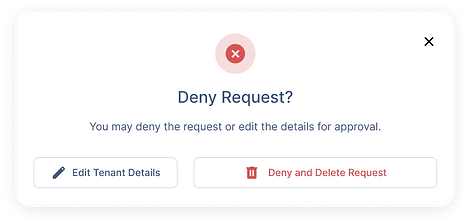
A simple confirmation dialog box for user to deny requests from the tenants.
After gathering valuable insights from the initial low fidelity mockup tests, we implemented the necessary adjustments and enhancements. These improvements were incorporated into the high fidelity mockups, which were then subjected to another round of rigorous testing to ensure a refined and user-centric design.
Key Enhancements based on feedback
Visitor Access Management:
Improved visibility of the Visitor Access section.
Enhanced the prominence of the generate button. Added tooltips for first-time users.
Leak Detection and Maintenance Alerts:
Improved visibility of the Visitor Access section.
Enhanced the prominence of the generate button. Added tooltips for first-time users.
Reviewing Security Footage:
Redesigned the date/time picker for better usability. Added filtering options and a timeline view.Implemented a tagging feature for easier incident identification.
Managing Security System Settings:
Improved navigation to the Access Management section.Repositioned the save button for better visibility. Added recent activity logs and automatic notification features
Managing Cloud Storage:
Enhanced navigation to the Cloud Storage section.Made the delete option for old footage more visible and accessible.Provided a detailed breakdown of storage types (snapshots vs. footage). Implemented an alert system to notify users when storage is nearing capacity.
FINAL TESTING RESULTS
The high fidelity mockups were tested with the same diverse group of participants, including residents, property managers, and security staff. The testing confirmed that the design enhancements addressed the previously identified issues and improved overall usability and functionality.
-
Navigation: Participants found the layout intuitive and easy to navigate.
-
Usability: Key tasks such as creating access codes, monitoring live feeds, and managing storage were completed smoothly.
-
Functionality: Additional features such as the full-screen viewing option, color-coded alerts, and automatic notifications were well-received.
Delivery and Implementation
With successful final testing, we proceeded to deliver the Security Management Software to Baytowne Apartments. The product was installed, and a comprehensive training session was conducted for the property managers and security staff to ensure a smooth transition and effective use of the new system.